在校外用 Clash Verge 连接 CUHK(SZ) VPN
本文在 Codex 辅助下完成。适用于 CUHK-Shenzhen 的
vpn.cuhk.edu.cn,不是香港本部的 VPN。
1 Why not use Cisco or EasyConnect?
在校外打开 SIS,先开学校 VPN;访问其他网站,又要切回 Clash。我希望这些操作能放在同一个界面里:学校网站走学校 VPN,其他流量继续按 Clash 的规则处理。
学校的官方方案使用 Cisco AnyConnect。这里改用兼容它的 OpenConnect,再通过 ocproxy 提供本地 SOCKS5,让 Clash 能把它当作一个节点使用。EasyConnect 属于另一套 VPN 客户端,不能仅凭服务器地址就套用本文的方法。
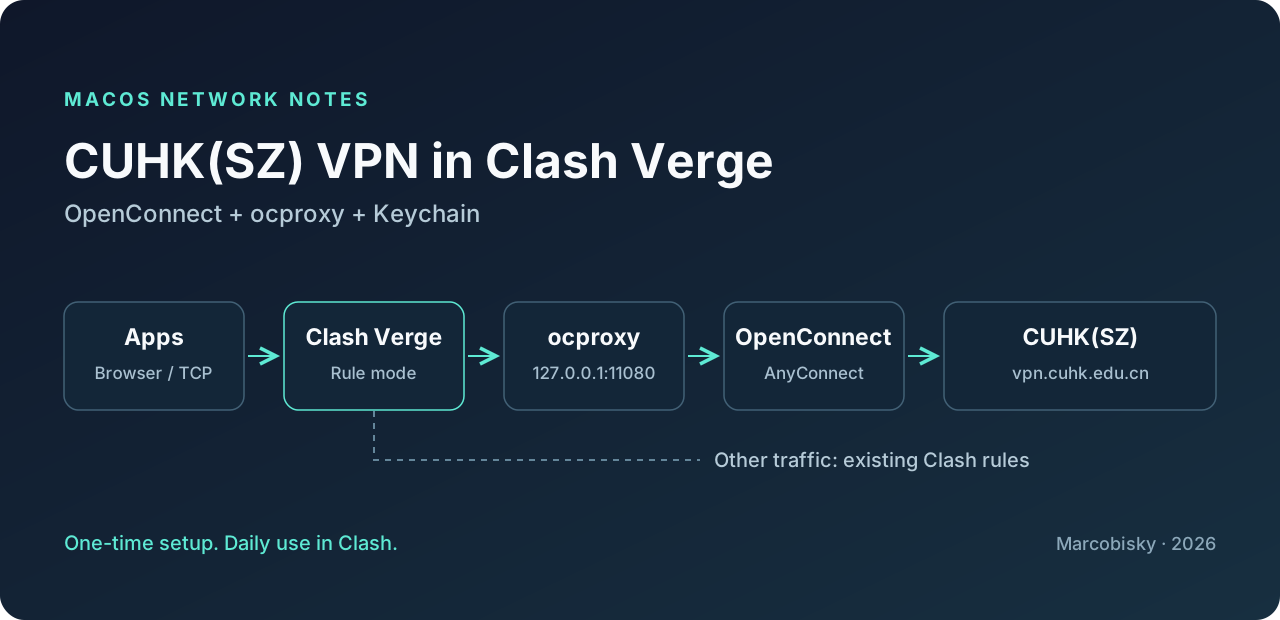
需要分清两件事:
| 组件 | 负责什么 |
|---|---|
| OpenConnect | 登录学校 VPN、维持 tunnel |
| ocproxy | 把 tunnel 暴露为 127.0.0.1:11080 的 SOCKS5 |
| Clash Verge | 按域名和 IP 分流 |
| macOS Keychain | 保存学校密码,供后台登录使用 |
Clash 本身不会登录 AnyConnect VPN。 本文让一个后台 helper 随 Clash 启动,因此日常不需要另开 VPN app,也不需要每次输入命令。安装时仍需要使用一次 Terminal。
2 Requirements
- 一台能正常使用 Homebrew 的 MacBook,以及具有 VPN 权限的 CUHK(SZ) 账号。
- 可以访问学校 VPN、Homebrew 和 GitHub 的网络。
- 安装包会通过 Homebrew 安装 OpenConnect、ocproxy、Python 和 Clash Verge Rev;不需要代理订阅也能只访问学校资源。
安装脚本自动识别 /opt/homebrew 和 /usr/local,不会复制我电脑上的 binary 或 Anaconda 路径。Homebrew 当前完整支持 Apple Silicon、macOS 15+;Intel 属于 Tier 3,部分依赖可能需要从源码编译。本文的连接方式已在 Apple Silicon Mac 上验证;附件做了 syntax 和 configuration checks,但没有在一台全新的 Intel Mac 上完整安装测试。
先确认两种密码不要填反:
| 输入位置 | 应该输入什么 |
|---|---|
installer 的 CUHK(SZ) username / student ID |
你自己的学号或学校用户名,不带邮箱后缀 |
| Terminal 的学校密码提示 | 你自己的学校 VPN 密码 |
| Homebrew 管理员授权、Keychain 系统弹窗 | 这台 Mac 的登录密码 |
下面的代码、下载文件都不包含我的学号或密码。读者的账号只会写入自己电脑上的 settings.json;密码保存在自己的 Keychain 中。
3 Configuration
3.1 1. Install Homebrew
如果已经能运行 brew --version,跳过这一步。否则打开 Terminal,执行:
/bin/bash -c "$(curl -fsSL https://raw.githubusercontent.com/Homebrew/install/HEAD/install.sh)"完成 installer 的提示;如果要求安装 Command Line Tools,也一并完成。安装期间要求的管理员密码是 Mac 登录密码。
3.2 2. Install the helper
下载 cuhk-vpn-setup.zip,解压到 Downloads,保持文件夹名为 cuhk-vpn-setup。执行:
bash "$HOME/Downloads/cuhk-vpn-setup/setup.sh"installer 会安装依赖、识别当前 Mac 的路径,并询问:
CUHK(SZ) username / student ID (without email suffix):在这里填自己的学号/用户名。 接下来的 password prompt 填自己的学校密码;输入不会回显。保存密码使用的是下面这条命令,其中 $vpn_account 就是刚才输入的账号:
/usr/bin/security add-generic-password \
  -a "$vpn_account" -s cuhksz-vpn-cli \
  -l 'CUHK(SZ) VPN CLI' -T /usr/bin/security -U -w
这里故意把 -w 放在最后,让 security 提示输入密码,不要把密码写进命令、文章、截图或 Git repository。-T /usr/bin/security 只指定这个命令行工具,不使用允许所有 app 访问的 -A。
安装完成后会打开这个永久目录,之后不要移动它:
~/Library/Application Support/CUHK-VPN/| 文件 | 用途 |
|---|---|
settings.json |
本机账号、Homebrew 可执行文件路径;不含密码 |
autostart.sh |
启动、停止、重连、检查状态 |
background.py |
自动登录和检查进程 |
bridge.sh |
启动 ocproxy;由 installer 生成 |
clash-script.js |
学校节点及分流规则 |
base-profile.yaml |
没有现成 profile 时使用的基础配置 |
state/ |
本机运行状态和日志;不要上传 |
#!/bin/bash
set -euo pipefail
umask 077
source_dir="$(cd -- "$(dirname -- "$0")" && pwd)"
if [[ "$(uname -s)" != Darwin ]]; then
  printf 'This installer is for macOS only.\n' >&2; exit 1
fi
brew_bin="$(command -v brew || true)"
if [[ -z "$brew_bin" ]]; then
  for candidate in /opt/homebrew/bin/brew /usr/local/bin/brew; do
    if [[ -x "$candidate" ]]; then brew_bin="$candidate"; break; fi
  done
fi
if [[ -z "$brew_bin" ]]; then
  printf 'Install Homebrew from https://brew.sh first, then rerun this script.\n' >&2
  exit 1
fi
"$brew_bin" install openconnect ocproxy python@3.14
if [[ ! -d '/Applications/Clash Verge.app' ]]; then
  "$brew_bin" install --cask clash-verge-rev
fi
brew_prefix="$("$brew_bin" --prefix)"
export PATH="$brew_prefix/bin:$brew_prefix/sbin:/usr/bin:/bin:/usr/sbin:/sbin"
python_bin="$brew_prefix/opt/python@3.14/bin/python3.14"
target="$HOME/Library/Application Support/CUHK-VPN"
mkdir -p "$target/state"
"$python_bin" - "$target" <<'CHECK'
import fcntl, pathlib, sys
p=pathlib.Path(sys.argv[1])/'state/background.lock'
with p.open('a+') as f:
    try: fcntl.flock(f, fcntl.LOCK_EX | fcntl.LOCK_NB)
    except BlockingIOError:
        sys.exit('The helper is running. Run autostart.sh stop before reinstalling.')
CHECK
read -r -p 'CUHK(SZ) username / student ID (without email suffix): ' vpn_account
if [[ -z "$vpn_account" ]]; then printf 'An account is required.\n' >&2; exit 1; fi
cp "$source_dir/background.py" "$source_dir/clash-script.js" "$source_dir/base-profile.yaml" "$target/"
"$python_bin" - "$target" "$python_bin" "$vpn_account" "$(command -v openconnect)" "$(command -v ocproxy)" <<'PY'
import json, pathlib, shlex, sys
root=pathlib.Path(sys.argv[1]); python=sys.argv[2]
settings={"account":sys.argv[3],"openconnect":sys.argv[4],"ocproxy":sys.argv[5]}
(root/'settings.json').write_text(json.dumps(settings,indent=2)+'\n')
bridge='#!/bin/bash\nset -e\nexec '+shlex.quote(settings['ocproxy'])+' -D 11080\n'
(root/'bridge.sh').write_text(bridge)
starter='#!/bin/bash\nset -eu\numask 077\n'
starter+='mkdir -p '+shlex.quote(str(root/'state'))+'\n'
command=shlex.quote(python)+' '+shlex.quote(str(root/'background.py'))
starter+='case "${1:-start}" in\n'
starter+='  stop|status) exec '+command+' "$1" ;;\n'
starter+='  restart) '+command+' stop ;;\n'
starter+='  start) ;;\n'
starter+='  *) echo "Usage: autostart.sh [start|stop|restart|status]" >&2; exit 2 ;;\nesac\n'
starter+='/usr/bin/nohup '+command+' run'
starter+=' </dev/null >>'+shlex.quote(str(root/'state/autostart.log'))+' 2>&1 &\nexit 0\n'
(root/'autostart.sh').write_text(starter)
for name in ('bridge.sh','autostart.sh','background.py'): (root/name).chmod(0o700)
PY
printf '\nSave your SCHOOL VPN password when prompted below. It will not be echoed.\n'
/usr/bin/security add-generic-password -a "$vpn_account" -s cuhksz-vpn-cli \
  -l 'CUHK(SZ) VPN CLI' -T /usr/bin/security -U -w
printf '\nInstalled in: %s\n' "$target"
printf 'Next: complete the Clash settings described in the article.\n'
/usr/bin/open "$target"helper 的关键操作是把 Keychain 中读取的密码通过 stdin 传给 OpenConnect,并通过 --resolve 指向真实 gateway IP。密码不放在命令参数中,也不关闭 TLS certificate verification。
#!/usr/bin/python3
"""Keep the school SOCKS bridge connected; started silently by Clash Verge."""

import fcntl
import ipaddress
import json
import os
from pathlib import Path
import shlex
import signal
import socket
import subprocess
import sys
import time

ROOT = Path(__file__).resolve().parent
SETTINGS = json.loads((ROOT / "settings.json").read_text())
STATE = ROOT / "state"
PID_FILE = STATE / "openconnect.pid"
CONNECTION_LOG = STATE / "connection.log"
BINARY = Path(SETTINGS["openconnect"])
OCPROXY = Path(SETTINGS["ocproxy"])
ACCOUNT = SETTINGS["account"]
SERVICE = "cuhksz-vpn-cli"
BRIDGE_BINARIES = {str(OCPROXY), str(OCPROXY.resolve())}


def log(message):
    print(time.strftime("%Y-%m-%d %H:%M:%S"), message, flush=True)


def process_path(pid):
    result = subprocess.run(
        ["/bin/ps", "-p", str(pid), "-o", "comm="],
        capture_output=True, text=True, timeout=5,
    )
    return result.stdout.strip() if result.returncode == 0 else ""


def connected_pid():
    try:
        pid = int(PID_FILE.read_text().strip())
        if pid <= 1:
            return None
        os.kill(pid, 0)
        return pid if process_path(pid) in {str(BINARY), str(BINARY.resolve())} else None
    except (OSError, ValueError, subprocess.SubprocessError):
        return None


def cleanup_bridge():
    result = subprocess.run(
        ["/usr/sbin/lsof", "-t", "-nP", "-iTCP@127.0.0.1:11080", "-sTCP:LISTEN"],
        capture_output=True, text=True, timeout=10,
    )
    for value in set(result.stdout.split()):
        pid = int(value)
        if process_path(pid) not in BRIDGE_BINARIES:
            raise RuntimeError("Another application is using local port 11080.")
        try:
            os.kill(pid, signal.SIGTERM)
        except ProcessLookupError:
            pass


def gateway_address():
    # Never hand OpenConnect a Clash fake-IP: it caches that address on reconnect.
    try:
        for item in socket.getaddrinfo("vpn.cuhk.edu.cn", 443, socket.AF_INET):
            address = item[4][0]
            if ipaddress.ip_address(address).is_global:
                return address
    except socket.gaierror:
        pass
    response = subprocess.run(
        ["/usr/bin/curl", "--fail", "--silent", "--show-error", "--connect-timeout", "5",
         "--max-time", "10", "https://dns.alidns.com/resolve?name=vpn.cuhk.edu.cn&type=A"],
        capture_output=True, timeout=15, check=True,
    )
    for answer in json.loads(response.stdout).get("Answer", []):
        if answer.get("type") == 1 and ipaddress.ip_address(answer["data"]).is_global:
            return answer["data"]
    raise RuntimeError("The school VPN gateway did not resolve to a public address.")


def connect_once():
    gateway = gateway_address()
    # Credentials stay in Keychain and in process memory; never in files or argv.
    try:
        credential = subprocess.run(
            ["/usr/bin/security", "find-generic-password", "-s", SERVICE,
             "-a", ACCOUNT, "-w"],
            stdout=subprocess.PIPE, stderr=subprocess.DEVNULL, timeout=120,
        )
    except subprocess.TimeoutExpired:
        log("macOS Keychain is waiting for authorization; retrying in 60 seconds.")
        return False
    if credential.returncode != 0 or not credential.stdout:
        raise RuntimeError("School password is unavailable in macOS Keychain.")
    cleanup_bridge()
    arguments = [
        str(BINARY), "--protocol=anyconnect", "--user=" + ACCOUNT, "--authgroup=CUHK(SZ)",
        "--passwd-on-stdin", "--non-inter", "--no-proxy", "--disable-ipv6",
        "--resolve=vpn.cuhk.edu.cn:" + gateway, "--reconnect-timeout=60",
        "--script-tun", "--script=" + shlex.quote(str(ROOT / "bridge.sh")),
        "--background", "--pid-file=" + str(PID_FILE),
        "https://vpn.cuhk.edu.cn/",
    ]
    with CONNECTION_LOG.open("wb") as output:
        process = subprocess.Popen(arguments, stdin=subprocess.PIPE,
                                   stdout=output, stderr=subprocess.STDOUT)
        try:
            process.communicate(input=credential.stdout.rstrip(b"\r\n") + b"\n", timeout=90)
        except subprocess.TimeoutExpired:
            process.send_signal(signal.SIGINT)
            try:
                process.wait(timeout=5)
            except subprocess.TimeoutExpired:
                process.kill()
                process.wait()
            return False
    credential = None
    if process.returncode == 0:
        log("School VPN connected.")
        return True
    details = CONNECTION_LOG.read_text(errors="replace").lower()
    network_failures = (
        "failed to connect", "failed to open https", "getaddrinfo", "could not resolve",
        "connection timed out", "network is unreachable", "no route to host",
        "failed to reconnect", "connection refused", "connection reset",
    )
    if any(text in details for text in ("login failed", "authentication failed", "invalid password")):
        raise RuntimeError("School VPN authentication failed; automatic attempts stopped.")
    if any(text in details for text in network_failures):
        log("VPN gateway unavailable; retrying in 60 seconds.")
        return False
    raise RuntimeError("School VPN connection failed; check state/connection.log. Automatic attempts stopped.")


def control(action):
    if action == "status":
        if not connected_pid():
            print("OpenConnect is not running.")
            return 1
        check = subprocess.run(
            ["/usr/bin/curl", "--socks5-hostname", "127.0.0.1:11080",
             "--connect-timeout", "3", "--max-time", "8", "--silent", "--show-error",
             "--output", "/dev/null", "--write-out", "%{http_code}",
             "https://sis.cuhk.edu.cn/"], capture_output=True, text=True, timeout=10)
        ok = check.returncode == 0 and check.stdout.startswith(("2", "3"))
        print("VPN is connected; SIS is reachable." if ok else
              "OpenConnect is running, but SIS is not reachable; check the logs.")
        return 0 if ok else 1
    if action != "stop":
        raise RuntimeError("Supported commands: status, stop, run.")
    try:
        worker = int((STATE / "background.lock").read_text().strip())
        command = subprocess.run(["/bin/ps", "-p", str(worker), "-o", "args="],
                                 capture_output=True, text=True, timeout=5).stdout
        if worker > 1 and worker != os.getpid() and str(Path(__file__).resolve()) in command:
            os.kill(worker, signal.SIGTERM)
    except (OSError, ValueError):
        pass
    pid = connected_pid()
    if pid:
        os.kill(pid, signal.SIGINT)
        deadline = time.monotonic() + 5
        while connected_pid() and time.monotonic() < deadline:
            time.sleep(0.1)
    if not connected_pid():
        cleanup_bridge()
    print("School VPN helper stopped.")
    return 0


def main():
    os.umask(0o077)
    STATE.mkdir(mode=0o700, exist_ok=True)
    # An OS lock is released automatically after crashes and prevents duplicate workers.
    with (STATE / "background.lock").open("a+") as lock:
        try:
            fcntl.flock(lock, fcntl.LOCK_EX | fcntl.LOCK_NB)
        except BlockingIOError:
            return 0
        lock.seek(0)
        lock.truncate()
        lock.write(str(os.getpid()) + "\n")
        lock.flush()
        log("Clash school VPN helper started.")
        while True:
            if connected_pid():
                time.sleep(15)
                continue
            try:
                succeeded = connect_once()
            except (subprocess.SubprocessError, socket.gaierror, json.JSONDecodeError) as error:
                log("Network or Keychain is temporarily unavailable; retrying in 60 seconds.")
                succeeded = False
            if not succeeded:
                time.sleep(60)
            else:
                time.sleep(15)


if __name__ == "__main__":
    try:
        action = sys.argv[1] if len(sys.argv) > 1 else "run"
        sys.exit(main() if action == "run" else control(action))
    except (RuntimeError, subprocess.SubprocessError, OSError) as error:
        log(str(error))
        sys.exit(1)
3.3 3. Add the Clash profile and rules
打开 Clash Verge → Profiles:
- 已经有 active profile: 继续使用它,保留原来的订阅节点。
- 全新安装,没有 profile: 选择 New → Local,命名为
CUHK,填入下面的内容,保存并选中它。
mixed-port: 7897
allow-lan: false
mode: rule
log-level: info
dns:
  enable: true
  enhanced-mode: fake-ip
  fake-ip-range: 198.18.0.1/16
  default-nameserver:
    - 223.5.5.5
  nameserver:
    - https://dns.alidns.com/dns-query
    - https://doh.pub/dns-query
proxies: []
proxy-groups: []
rules:
  - MATCH,DIRECT
然后在 Profiles → Global Extend Script 上右键,选择 Edit File,将默认 script 替换为下面的代码并保存。
如果原来已经写过自定义 script,先备份并合并逻辑,不要直接覆盖。后面的 profile-level script 也可能覆盖全局设置。
// Add CUHK(SZ) to an existing profile, preserving its other proxy nodes and rules.
function main(config) {
  const group = 'CUHK(SZ)';
  const node = 'CUHK OpenConnect';
  config.proxies = [...(config.proxies || []).filter(p => p.name !== node),
    {name: node, type: 'socks5', server: '127.0.0.1', port: 11080, udp: false}];
  config['proxy-groups'] = [{name: group, type: 'select', proxies: [node, 'DIRECT'],
    url: 'http://cp.cloudflare.com/generate_204', 'expected-status': 204},
    ...(config['proxy-groups'] || []).filter(g => g.name !== group)];
  const dns = config.dns || (config.dns = {});
  if (dns['fake-ip-filter-mode'] && dns['fake-ip-filter-mode'] !== 'blacklist')
    throw new Error('This extension requires blacklist fake-IP filtering.');
  dns['fake-ip-filter'] = [...new Set([...(dns['fake-ip-filter'] || []),
    'vpn.cuhk.edu.cn', 'vpnhk.cuhk.edu.cn'])];
  dns['nameserver-policy'] = {...(dns['nameserver-policy'] || {}),
    '+.cuhk.edu.cn': ['tcp://10.20.220.50#' + group],
    'vpn.cuhk.edu.cn': ['223.5.5.5#DIRECT'],
    'vpnhk.cuhk.edu.cn': ['223.5.5.5#DIRECT']};
  const rules = ['DOMAIN,vpn.cuhk.edu.cn,DIRECT', 'DOMAIN,vpnhk.cuhk.edu.cn,DIRECT',
    'DOMAIN-SUFFIX,cuhk.edu.cn,' + group,
    'IP-CIDR,10.20.0.0/16,' + group + ',no-resolve',
    'IP-CIDR,10.10.10.10/32,' + group + ',no-resolve'];
  config.rules = [...rules, ...(config.rules || []).filter(r => !rules.includes(r))];
  return config;
}
其中 10.20.220.50 是本次连接收到的学校 DNS。它通过学校 SOCKS tunnel 访问;gateway 自己始终使用 DIRECT,避免把连接 VPN 的流量又送进 VPN。若学校以后调整 DNS 或内网网段,需要相应更新这份配置。
3.4 4. Start with Clash
在 Settings 中完成以下设置:
| 设置 | 操作 |
|---|---|
| Startup Script | 点击 Browse,选择永久目录内的 autostart.sh |
| Auto Launch | 开启,让 Clash 随登录启动 |
| Silent Start | 开启,不自动弹出主窗口 |
| System Proxy | 开启,让浏览器等应用使用 Clash |
| TUN Mode | 需要接管不使用 System Proxy 的应用时再开启,按提示安装 Clash service |
在文件选择窗口中可以按 ⌘⇧G,粘贴:
~/Library/Application Support/CUHK-VPN选好 autostart.sh 后,完整退出 Clash 再重新打开一次,不是只关掉窗口。首次配置会中断当前代理连接,先结束正在进行的下载等操作。
若出现 Keychain 弹窗,确认请求方是 security、项目是 CUHK(SZ) VPN CLI,输入 Mac 登录密码,选择 Always Allow。这一步需要本人完成;后台脚本不能代替你解锁 Keychain。
4 Quick Start
配置完成后,日常只需要:
也可以直接检查学校资源是否可达:
bash "$HOME/Library/Application Support/CUHK-VPN/autostart.sh" status成功时输出:
VPN is connected; SIS is reachable.恢复连接、彻底停止 tunnel 的命令分别是:
# 重新登录学校 VPN,不需要重启 Clash
bash "$HOME/Library/Application Support/CUHK-VPN/autostart.sh" restart

# 停止 helper 和 OpenConnect
bash "$HOME/Library/Application Support/CUHK-VPN/autostart.sh" stop
在节点组里选择 DIRECT 只改变分流,不会退出学校 VPN;关闭 Clash 窗口也不会退出后台 helper。 切换到其他 Rule profile 时,全局 script 仍会添加学校节点;不要改成 Global 后再把学校节点当作通用出口。
5 Common problems
5.1 节点显示 Timeout,但 SIS 可以打开
Latency test 只说明某个测试 URL 是否能访问,不等于学校资源是否可用。本文使用:
http://cp.cloudflare.com/generate_204这个 endpoint 的预期 status 是 204。不要直接把返回普通网页的 SIS 填成 latency test URL;在本次配置中,SIS 网页请求成功,Mihomo 的该 URL probe 却失败了。
如果改过组内的自定义 test URL,也要恢复到上述地址,再测试一次。最终以 status 命令或实际打开 SIS 为准。
5.2 配置重载后断线,甚至出现 certificate mismatch
Clash 的 fake-IP 是临时映射。若 OpenConnect 记住了旧的 198.18.x.x,配置重载后重连可能连到别的网站。本文同时做了两件事:
- gateway 域名加入
fake-ip-filter。 - helper 在每次登录前解析真实公网 IP,并传入
--resolve,不会把 fake-IP 当成长期 gateway。
不要根据报错随手信任一个 certificate pin,也不要关闭 TLS verification。先运行上面的 restart,再检查日志。
5.3 一直等待,或者 Keychain 不弹窗
先解锁 Mac,确认 Keychain 中存在 cuhksz-vpn-cli,且 account 与 settings.json 里的学校账号一致;再运行 restart。看到系统授权窗口后填写 Mac 登录密码并选择 Always Allow。
学校密码改了,需要在 Keychain Access 中更新对应项目。不要通过修改 settings.json 保存明文密码。认证失败时 helper 会停止尝试,避免连续错误登录;更新后手动 restart 即可。
5.4 其他问题先看哪里?
tail -n 30 "$HOME/Library/Application Support/CUHK-VPN/state/autostart.log"
tail -n 30 "$HOME/Library/Application Support/CUHK-VPN/state/connection.log"| 现象 | 检查项 |
|---|---|
找不到 brew |
完成 Homebrew 安装;installer 会检查 Apple Silicon、Intel 的常见路径 |
11080 被占用 |
先停止旧的 helper;不要同时运行旧版脚本和本文安装包 |
| 选了节点仍打不开 | 确认是 Rule mode、helper 已登录,以及 profile script 没有覆盖规则 |
ping 不通或某些应用仍失败 |
ocproxy 提供 TCP bridge,不提供任意 UDP、ICMP 或入站连接;检查应用是否使用 Clash |
| 已有其他 Startup Script | Clash 只能指定一个;保留原 script,并在其中调用本文的 autostart.sh |
本文是第三方连接方案,不替代学校 ITSO 的客户端支持。如果学校改用 SSO/MFA、调整认证策略或网关配置,脚本可能需要跟着更新。
5.5 References
- CUHK(SZ) ITSO:VPN 常见问题
- OpenConnect:支持的 VPN protocols
- OpenConnect:通过 ocproxy 提供 SOCKS access
- Homebrew:安装要求、OpenConnect、ocproxy
- Clash Verge Rev:扩展脚本
- macOS 自带说明:
security add-generic-password -h(说明-w放在最后时使用交互式 password prompt)